
Best Gaming Accessories for Mobile: What Players Need
Find the best mobile gaming accessories for your setup, from controllers and headsets to stands and chargers, with practical compatibility and buying advice.

The best gaming accessories for mobile are the ones that fix a problem you actually have: a controller for awkward touch controls, a stand for neck strain, a headset for clearer audio, or a charger for long sessions. Start with your phone, games, and playing habits, then check compatibility before buying. Most players need only one or two useful additions.
A good setup depends on where and how you play. A clip-on controller may suit someone who plays action games on the go, while a stable stand and a comfortable headset may work better for longer sessions at home.
Think of accessories as targeted upgrades, not a checklist. The sections below compare common options, show how to assess fit and connection requirements, and flag the practical details that can make an otherwise appealing purchase frustrating.
- Start with the device, games, and playing habits you already have.
- Buy an accessory only when it addresses a clear comfort, control, audio, or power problem.
- Compare fit, connection, game support, and everyday convenience before choosing.
- Test one upgrade at a time so you know what genuinely improves your sessions.
Start With the Mobile Gaming Setup You Have
Map Your Current Setup
Write down the phone or tablet you play on, the games you return to, and where you usually play. A player who mostly uses a tablet at a desk has different needs from someone playing on a phone during a commute. This quick inventory keeps you focused on accessories that fit your actual routine.
Notice what interrupts a session before shopping. If your hands tire during long matches, grip or support may matter more than audio; if you miss touch inputs in a fast game, a controller deserves a closer look. For accessories listed by a Turkish seller, bugünkü döviz kurları can clarify the currency context before you decide whether to investigate further.
Check whether you already own something that can solve the problem. A stable phone stand, wired earbuds, or a charger with a suitable cable may be enough to improve your setup. Testing what you have first also helps you describe the feature you need, such as adjustable viewing angle or a secure grip.
Match Gear to Play Habits
Your usual playing position can narrow the choices quickly. Commuters may value compact gear that packs away easily, while players at home can prioritize a wider stand or a full-size headset. If you switch between phone and tablet, choose accessories that can accommodate both rather than buying separate items without checking fit.
Different genres also place different demands on controls. A turn-based game or a card game may feel natural on a touchscreen, while a platformer or racing game can benefit from physical inputs. Before choosing a controller, consider whether the games you play support one and whether its button layout suits those games.
Set a practical limit on what you want the accessory to change. For example, decide whether you need steadier viewing, less hand strain, clearer communication, or longer play away from an outlet. A clear goal makes product comparisons easier and reduces the chance of paying for features that do not affect your sessions.
Decide Which Accessories Solve a Real Problem

Start With Comfort
If your hands or neck become uncomfortable, change how you hold or view the device before adding more features. A grip can make a phone easier to hold, and a stand can bring a screen closer to eye level. Choose support that stays stable on the surfaces where you normally play.
Weight and shape matter as much as a product’s feature list. A bulky grip may be tiring on a small phone, while a stand designed for a desk may be awkward to carry. Look for adjustable parts that hold the device securely, and check whether a case needs to come off for the accessory to fit.
Try changing your posture during play, too. Resting your arms on a table or taking short breaks can address strain without another purchase. If discomfort persists, stop the session and adjust your setup rather than assuming a new accessory will make an unsuitable position comfortable.
Prioritize Control and Sound
Choose a controller when touch inputs feel imprecise or cover too much of the screen, not simply because a game looks better with physical buttons. Confirm that your preferred titles recognize the controller and that the control layout makes sense for them. Some games still require touchscreen menus, so check how switching between input methods works.
Headsets can help when game audio is hard to hear through a phone speaker or when you need a microphone for team chat. Consider whether you want a wired connection, wireless freedom, or an open-ear design that lets you hear your surroundings. Comfort during longer sessions and easy access to mute controls are useful practical checks.
Avoid buying a controller and headset at the same time unless both solve separate problems. Try one change first, then see whether it improves your sessions before spending on another accessory. That approach makes it easier to identify which feature matters and avoids ending up with gear that rarely leaves a drawer.
Compare Controllers, Headsets, and Other Options
Choose the Right Control Style
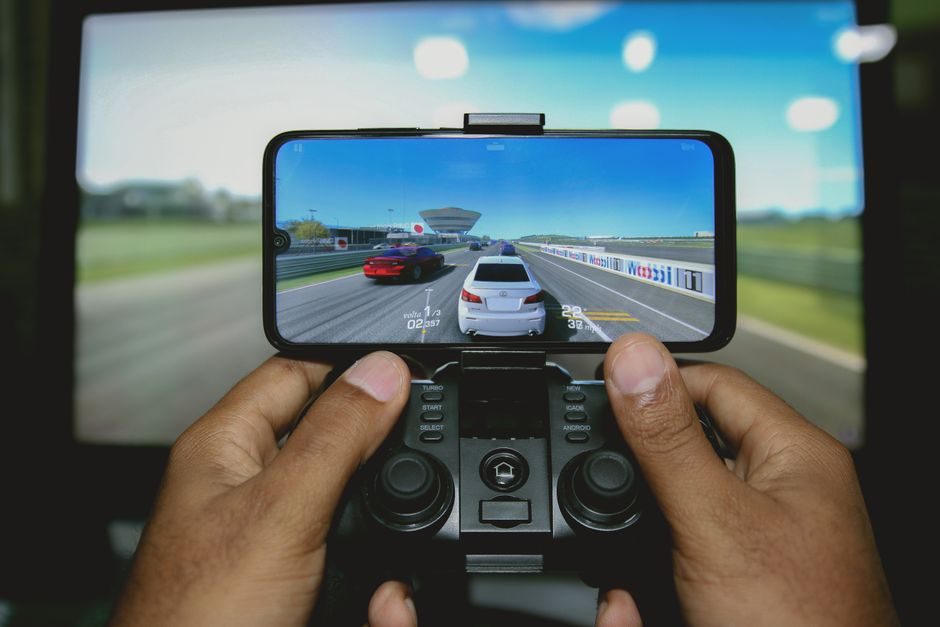
A clip-on mobile controller keeps controls close to the phone and is convenient for handheld play, but its fit depends on the device’s dimensions and case. A separate wireless controller offers a familiar grip and may work across devices, though it needs a stable way to prop up the screen. Compare how each option fits your games and where you play.
When estimating a specific item listed in dollars, a dolar TL çevirici can make the conversion easier to follow. Treat the converted amount as one part of the decision, then check delivery details, return terms, and whether the seller’s listing matches your device. A low listed price is not helpful if the controller cannot connect or fit.
For a realistic comparison, imagine playing a platform game on a phone during a trip. A compact clip-on controller may keep the setup together, while a separate controller may be more comfortable at a table but require extra space. If touch controls already feel good, keeping the phone as it is may be the better choice.
| Option | Best suited to | Check before choosing |
|---|---|---|
| Clip-on controller | Handheld play with physical controls | Phone dimensions, case fit, game support |
| Separate wireless controller | Flexible play across supported devices | Pairing, screen support, charging |
| Wired earbuds | Simple audio without headset charging | Phone port, cable reach, microphone |
| Stand or grip | Screen support or easier handheld hold | Stability, portability, device fit |
Compare Audio and Support
For audio, compare wired earbuds, wireless earbuds, and over-ear headsets by comfort, connection, and microphone needs. Wired options avoid charging the headset, but the phone may lack a compatible port or leave no convenient charging connection. Wireless models reduce cable clutter, yet they add another battery and pairing step.
A stand or grip may offer more value than a new audio device if your main problem is viewing angle or hand fatigue. Stands suit stationary play and can keep a screen visible during a controller session; grips are easier to carry but do not necessarily improve posture. Match the accessory to the discomfort you want to reduce.
Look beyond headline features and inspect everyday details. Check whether headset controls are reachable while playing, whether a stand folds for storage, and whether a grip blocks buttons or ports. These small design choices often determine whether an accessory becomes part of your normal setup or an item you stop using.
Confirm the accessory supports your exact device and operating system before ordering.
Check Compatibility Before You Buy
Verify Device and Game Support
Confirm the accessory supports your exact device and operating system before ordering. Check the connection type, supported device dimensions, and whether the product can accommodate your case. A controller that pairs successfully may still be too wide for a phone with a bulky case, so fit and connection are separate checks.
- Confirm your device model and operating system.
- Check the accessory’s connection type and physical fit.
- Verify support in the games you play.
- Review setup requirements and return terms.
Game support is just as important as phone support. Look for confirmation that the titles you play accept the accessory’s input method, and check whether controls can be remapped if the default layout feels unfamiliar. Some games offer partial controller support, so menus or specific actions may still require touchscreen input.
Read setup instructions and return conditions before purchase, especially when the listing is unclear. Look for details on pairing, charging, required software, and any port adapters needed. If those basics are missing, ask the seller to confirm them rather than assuming a general compatibility label covers your particular device and game.
Check Power and Connection Needs
Think through charging while you play, not just the accessory’s connection method. Some wired setups occupy a phone port, which can make simultaneous charging difficult without a suitable adapter. Wireless gear avoids that particular cable, but controllers and headsets may need charging themselves, so check battery and charging details before relying on them.
Bluetooth pairing is convenient, but it can involve reconnecting devices or managing multiple paired accessories. Wired connections can reduce pairing steps, though cables may catch on hands or furniture during play. Choose the approach that suits your environment, and test the connection at home before taking new gear on a trip.
Finally, consider how accessories affect the rest of your setup. A phone cooler, grip, or controller should not block charging access, speakers, or buttons you still use. Check the product’s shape against your device and case, and make sure the combined setup remains easy to hold, store, and disconnect when play is over.
Account for Overseas Listings and Currency Changes
Compare the Full Checkout Cost
When an accessory is listed in another currency, compare the final checkout amount rather than the displayed price alone. Shipping, import charges, and payment-provider conversion fees can change what you actually pay. A controller that looks inexpensive on a foreign storefront may cost more than a compatible option sold by a US retailer.
Check whether the listing states the currency clearly, especially when a price appears beside a familiar dollar sign. Review the order total before confirming payment, and look for shipping and tax details in the seller’s checkout. If those costs appear only after you enter an address, pause and compare the complete total with another source.
For a quick check on the Turkish-lira equivalent of a dollar-priced accessory, bugün dolar kaç TL can help inform your spending decision. Treat a conversion as an estimate, since your card issuer may use a different rate or add a fee. The amount charged at checkout is the practical figure to use when deciding.
Check Seller and Return Terms
Before ordering from an overseas seller, confirm that the product is intended for your phone or tablet and that the listing describes the exact model. Similar-looking accessory names can refer to different connection types or device sizes. Read the return policy before buying, because international returns can take longer and may require you to pay shipping.
Look for a clear warranty statement and a way to contact the seller if the accessory arrives damaged or does not work as described. A listing with little product detail makes it harder to resolve a dispute later. Save the order confirmation and product description until you have tested the item with your device.
Conversion tools can help translate a listed amount into a familiar currency, but they do not predict the final charge. Your payment card, bank, or marketplace may apply its own exchange rate and fees. Use the conversion as a comparison aid, then check the checkout total and payment terms before placing an order.
Avoid Overpaying for Features You Will Not Use
Match Features to Your Games
Choose accessories around the games you play most, rather than paying for a long feature list. A clip-on controller can help with games built for physical inputs, while a basic stand may be enough for turn-based play. If your favorite titles rely on touch controls, extra buttons may add bulk without improving the experience.
- Start with the games you play most.
- Confirm that software supports the feature.
- Pay extra only for a need you can identify.
Read the feature descriptions closely and separate practical functions from optional extras. Programmable buttons, adjustable triggers, and lighting can be useful for some players, but they do little if a game cannot use them. Check the games’ control options and the accessory’s supported functions before deciding that a premium feature matters.
Consider how often you will use each accessory and where you will use it. A headset with a detachable microphone may suit multiplayer sessions, while a compact wired pair may be simpler for travel. Paying for specialized features makes sense when they solve a recurring problem, not merely because they sound impressive.
- Match controller inputs to your usual games.
- Check whether titles support remapping.
- Skip features you cannot name a use for.
Compare Value Beyond the Price
A low-cost accessory is not automatically a bargain if it fits poorly, disconnects, or needs frequent replacement. Compare the build, connection method, warranty, and return options alongside the price. For a controller, check the grip and button layout; for a stand, look for a stable base that holds your device securely.
Avoid buying several products that solve the same problem. A phone stand and a controller with an integrated stand may overlap, while a headset and separate earbuds may both cover your audio needs. Make a short list of what your current setup lacks, then buy only the item that fills the most important gap.
When reviews are available, look for recurring details about comfort, compatibility, and reliability rather than relying on a single glowing comment. Reviews that mention the same phone model or game type are especially useful. Treat vague claims and unusually sparse product information as reasons to research further, not as proof of quality.
Build a Comfortable, Portable Setup
Reduce Strain During Play
Set your screen at a height and angle that let your shoulders relax and your wrists stay comfortable. A small adjustable stand can lift a phone or tablet without forcing you to hold it throughout a session. Keep the device close enough to read clearly, and take breaks if your hands or neck begin to feel strained.
A controller can reduce repeated tapping for games that support physical inputs, but its shape matters as much as its buttons. Try to choose grips that let your fingers rest naturally without squeezing. If you play on a tablet, check that the controller’s weight and clamp do not make the combined setup awkward to hold.
Headsets and earbuds should stay comfortable through the length of a typical session. Look for secure fit, accessible volume controls, and a microphone position that does not need constant adjustment. If you play in shared spaces, closed-back headphones may limit sound leakage, while open earbuds can make it easier to hear nearby activity.
Pack Only What You Need
For gaming away from home, choose accessories that fit easily in the bag you already carry. A compact controller, short charging cable, and small stand can cover common needs without turning a quick session into a bulky kit. Check whether your controller folds or detaches before assuming it will be easy to pack.
Keep cables from tangling by separating them from grips and controls, and use a small pouch if loose accessories rub against your phone screen. A short cable can reduce clutter at a desk, but make sure it reaches the power source where you actually play. A longer cable may be more practical for a shared charging spot.
Think through the order you will set up and pack away your gear. Items that need frequent charging should remain easy to reach, while delicate earbuds can go in a case. If you need several adapters to connect everything, consider whether a simpler accessory would make the setup faster and more dependable.
- Choose a controller that fits your usual bag.
- Use a case for earbuds and small adapters.
- Check cable length at your regular play spot.
Care for Your Accessories and Keep Them Useful
Store and Clean Gear Safely
Store controllers, earbuds, and charging cables where they will not be crushed or pulled by their connectors. A case helps protect small items in a backpack, while a loose coil can reduce stress on a cable. Avoid wrapping a cord tightly around a charger or device, since sharp bends can wear the outer covering.
- Avoid tightly wrapping cables; coil them loosely instead.
- Do not clean powered accessories; disconnect them first.
- Replace damaged cables instead of forcing a connection.
Clean accessories according to the manufacturer’s care guidance, especially around buttons, ports, and ear tips. Disconnect power before wiping a controller, and keep liquids away from charging openings. For earbuds, remove and clean detachable tips separately when the product instructions allow it, then let every part dry before use.
Check cables and connectors occasionally for fraying, looseness, or unusual heat during charging. Stop using a cable that has exposed wires or a damaged plug, rather than continuing to bend it into a working position. Keeping accessories clean and checking for wear can help you catch a problem before it interrupts a session.
Keep Connections Working
If a wireless accessory stops connecting, check its battery and the device’s Bluetooth settings before assuming it is broken. Remove an old pairing if the accessory is listed but will not reconnect, then follow its pairing instructions again. Keep the accessory’s software or firmware current when its maker provides a supported update method.
For wired gear, inspect the plug and phone port for lint or debris before reconnecting. Do not push a sharp object into a port, since that can damage the contacts. If the accessory works with another compatible device, the issue may be with the original phone’s settings or port rather than the accessory itself.
Keep the instructions, warranty details, and model information somewhere you can find them. Those details help when you need to check charging requirements, supported connections, or a replacement part. If troubleshooting does not fix a recurring fault, stop using the accessory and contact the seller or manufacturer through its stated support channel.
Frequently asked questions
Can I use a mobile gaming controller with every game?No. Controller support depends on the game and sometimes on the device or operating system. Check a game’s control settings or official description before buying a controller for it. Some games continue to rely on touch input, so a controller may be useful for only part of your library. If possible, test the controller with the titles you play most before choosing a more specialized model.
Are wired or wireless accessories better for mobile gaming?Neither connection is best for every player. Wired accessories avoid pairing and battery concerns, but cables can limit movement and may need an adapter. Wireless gear reduces clutter and can be easier to pack, though it needs charging and a reliable connection. Choose based on where you play, which ports your device has, and whether you mind keeping another accessory charged.
What should I check before buying a mobile gaming headset?Check that the headset works with your device’s connection type and that its microphone is supported by the games or voice chat apps you use. Consider comfort, fit, cable length, and how easily you can adjust volume. If you choose wireless audio, confirm how it pairs and charges. For shared spaces, also think about sound leakage and whether you need to hear people nearby.
Does a phone stand improve gaming comfort?A stand can help by holding the screen at a steady angle, which may reduce the need to grip your phone during play. It is most useful for games that do not require constant movement or touch input across the whole screen. Look for a stable base and adjustable viewing angle, and make sure the stand does not block buttons, ports, or airflow.
Choose Gear That Fits Your Play
The most useful mobile gaming accessories solve a specific problem: a controller improves supported games, a headset helps with audio and communication, and a stand can make hands-free play more comfortable. Check device and game compatibility, total cost, fit, and portability before buying. A small setup chosen for your routine is usually more practical than a collection of features you rarely use.
Start by identifying the one part of mobile play that frustrates you most, then compare accessories that address it. Check the return terms and connection requirements, and test the new item with your usual games as soon as it arrives. If it makes play more comfortable or reliable without adding needless bulk, keep it; otherwise, use the return option and reconsider what your setup actually needs.

Add Online Gaming News as a preferred source on Google


